4. Building an RMI Application
4.1. About RMI Applications
The process of building an OpenSplice RMI application is shown in Steps Building Applications with RMI below. The different steps are described in the following subsections.
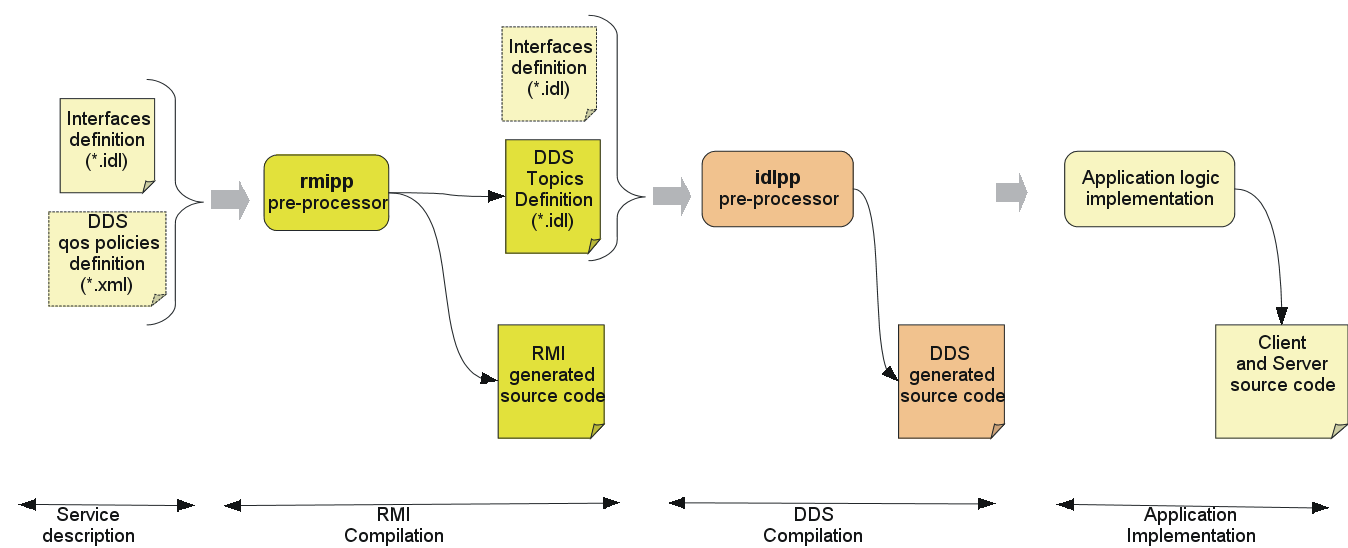
Steps Building Applications with RMI
4.2. Services description
The first step in building an RMI application is the definition of its
provided services in terms of interfaces. The application interfaces
should be declared using the OMG IDL language. The operations parameters
can be either of basic (short, long, …) or complex (struct,
sequence, string, …) types. However, the following restrictions
should be respected:
the
Anyand thevaluetypeIDL types are not supported because they are not supported by the underlying DDS DCPS layer.Uniontype is also not supported.Exceptions are not supported at this time.
Each interface must extend
DDS_RMI::Servicesbase interface to indicate that it is invocable over DDS. This interface is defined in the filedds_rmi.idl, which must be included.Each interface must be declared `local’.
Oneway operations are supported. The semantics of oneway operations is the same as for the OMG CORBA interfaces. A oneway operation must not contain any output parameter and must return a void type.
The following IDL snippet shows an example of a service data description:
#include "dds_rmi.idl"
module HelloWorld
{
  // interface definition
local interface HelloService : ::DDS_RMI::Services
{
  string greet();
};
};
4.3. QoS policies description
The OpenSplice RMI module provides the ability to tune the quality
of service of the services invocations (requests and/or replies), if
needed, by setting the underlying DDS QoS policies. By default, the DDS
RMI module uses the default values of the DDS QoS policies except for
the reliability QoS policy which is set to RELIABLE.
If needed, the application designer can define the QoS policies to be set on the invocations in an XML file. This file must respect the XML schema given in QoS policies XML schema.
Note that setting the DDS QoS policies requires a good knowledge of the rules for mapping the specified interfaces onto the DDS topics description (please refer to RMI Interface to DDS topics mapping rules).
The following XML snippet shows an example:
<?xml version="1.0" encoding="ISO-8859-1" ?>
<dcps xmlns="http://www.omg.org/dds/"
xmlns:xsi="http://www.w3.org/2001/XMLSchema-instance"
xsi:schemaLocation="http://www.omg.org/dds/DCPS.xsd">

<domain id="">
  <topic name="greet_req"
idltype="::HelloWorld::HelloService::greet_request" idlfile="">

  <topic_qos>
  <destinationOrderQosPolicy>
    <destinationOrderKind>
      BY_SOURCE_TIMESTAMP_DESTINATIONORDER_QOS
    </destinationOrderKind>
  </destinationOrderQosPolicy>

  <durabilityQosPolicy>
    <durabilityKind>
      PERSISTENT_DURABILITY_QOS
    </durabilityKind>
  </durabilityQosPolicy>

  <latencyBudgetQosPolicy>
    <duration>
      <nanosec>10000000</nanosec>
      <sec>0</sec>
    </duration>
  </latencyBudgetQosPolicy>

  <reliabilityQosPolicy>
    <duration>
      <nanosec>100000000</nanosec>
      <sec>0</sec>
    </duration>
  <reliabilityKind>
    RELIABLE_RELIABILITY_QOS
  </reliabilityKind>
  </reliabilityQosPolicy>

  </topic_qos>

  </topic>

</domain>
</dcps>
This example specifies the QoS policies to be applied on the topic
invocation request of the greet operation of the interface
HelloWorld::HelloService. Note that the invocation request topic is
named greet_req and its IDL type is
HelloWorld::HelloService::greet_request.
4.4. RMI compilation
Once the application has defined its services and (optionally) its QoS settings, these definitions are compiled to generate type-specific code for the application services invocation.
The RMI compilation is done using the rmipp pre-processor applied on
the interfaces definition file and the QoS file if it exists.
The rmipp usage is:
rmipp [-l (java | c++)] [-I <path>] [-d <directory>] [-topics
<qos_file>] [-P dll_macro_name[,<header-file>]] <interfaces_file>
The parameters are:
- -l (java | c++)
Define the target language. The C++ language is the default.
- -I <path>
Define the include path directives.
- -d <directory>
Define the location to place the generated files.
- -topics <qos_file>
Define the XML file including the QoS policies settings.
- -P dll_macro_name[,<header-file>]
Only applicable to C and C++. Sets export macro that will be prefixed to all functions in the generated code. This allows creating DLLs from generated code. Optionally a header file can be given that will be included in each generated file.
- <interfaces_file>
The IDL file including the interfaces definition.
The rmipp compilation will generate a set of Java or C++ source files
as well as an IDL file including the mapping of the provided interfaces
onto the DDS topics. The generated IDL file name is the interfaces file
name with “_topics” concatenated.
Rmipp follows the mapping rules described in
Language mapping for OpenSplice RMI.
Example usage:
rmipp -d generated HelloService.idl
The generated directory will include:
HelloService_topics.idlHelloService_Interface.hHelloService_Interface.cppHelloService_InterfaceProxy.hHelloService_InterfaceProxy.cpp
In addition, the rmipp compiler performs a DDS compilation to generate
the DDS/DCPS code that is required to support the requests/replies
transport over DDS.
4.5. Application implementation
As mentioned before, the target applications have a client/server design. A typical application includes a server part that implements the provided interfaces, and a client part that invokes these interfaces. This section describes the programming model of both parts.
4.5.1. Runtime starting and stopping
Any DDS RMI application process must initialize the RMI runtime prior to any other operation, regardless of whether it is a client and/or a server process. The runtime initialization sets up the underlying DDS infrastructure and configures it to make the services invocable and the clients capable of invoking the services. It is also important to stop the runtime when the application is no longer using RMI.
The following code snippets show the runtime initialisation and stopping procedure in C++ and Java.

RMI runtime starting and stopping in C++
01  #include "ddsrmi.hpp"
02
03  using namespace org::opensplice::DDS_RMI;
04
05  int main (int argc, char * argv [])
06  {
07    CRuntime_ref runtime = CRuntime::getDefaultRuntime();
08    if (runtime.get() == NULL)
09    {
10      std::cout << "Failed to get the Runtime " << std::endl;
11      exit(1);
12    }
13
14    //starting the runtime
15    bool result = runtime->start(argc, argv);
16    if (result !=true)
17    {
18      std::cout << "Failed to start the Runtime " << std::endl;
19      exit(1);
20    }
21    ...
22
23    //stopping the runtime
24    result = runtime->stop();
25    if (result !=true)
26    {
27      std::cout << "Failed to stop the Runtime " << std::endl;
28      exit(1);
29    }
30  }
Comments below refer to line numbers in the sample code above:
- 1 Include the OpenSplice RMI library header file.
Any OpenSplice RMI application should include this file.
3 Declare the usage of the OpenSplice RMI library namespace.
- 7-12 Get the default DDS runtime.
This selects the default DDS domain as the data space where all subsequent RMI requests and replies will be exchanged.
- 15-20 Initialize the created runtime.
This creates all the needed DDS entities. A set of configuration options can be passed to the
startoperation viaargcandargvparameters. This latter is a string array including possible option names and values, andargcis the length of this array. Note that these parameters are typically the same parameters that were passed to the main program so that the RMI options can be specified on the command line, each following the format ‘--option=value’. All of the supported options are described in the section RMI Runtime Configuration Options.- 24-28 Stop the created runtime.
This removes all the created DDS entities and releases the RMI-allocated resources. It is strongly recommended to stop the runtime when it no longer needed.
The Java code below works in a similar way.

RMI runtime starting and stopping in Java
import org.opensplice.DDS_RMI;

static void main (String[] args)
{

  CRuntime runtime = CRuntime.getDefaultRuntime();
  if(null == runtime)
  {
    System.out.println();
    System.exit(1);
  }

  //starting the runtime
  boolean result = runtime.start(args);
  if(!result)
  {
    System.out.println("Failed to start the Runtime") ;
    System.exit(1);
  }
  ...
  //stopping the runtime
  result = runtime.stop();
  if(!result)
  {
    System.out.println("Failed to stop the Runtime") ;
    System.exit(1);
  }
}
4.5.2. Server programming model
At the server side of the application, each provided interface should be implemented, then instantiated and finally registered to be invocable via OpenSplice.
To define an implementation, the application developer must write an
implementation class including public methods corresponding to the
operations of the related IDL interface. The rmipp compilation
generates for each interface a skeleton class, named
::DDS_RMI::HelloWorld::HelloServiceInterface, that must be extended
by the application-supplied implementation class. The language mapping
rules of the RMI IDL interfaces are given in
Language mapping for OpenSplice RMI.
To make an interface invocable over DDS, it must be registered within the RMI framework, then activated. The registration process requires the following information:
the implementation class object
the server name, as well as a unique id identifying that interface inside the server.
The services activation makes the RMI runtime wait for incoming requests for all the registered services.
The following code snippets show the server programming model in C++ and Java.
C++ RMI interface implementation
class HelloService_impl :
      public virtual DDS_RMI::HelloWorld::HelloServiceInterface
{
public:
    HelloService_impl();
   ~ HelloService_impl();

   virtual DDS::String greet ();
}
Java RMI interface implementation
public class HelloService_impl :
DDS_RMI.HelloWorld.myInterfaceInterface {
   public String greet ()
   {
      // operation implementation
   }
}
C++ RMI server
01   #include “ddsrmi.hpp”
02   #include “HelloService_Interface.hpp”
03
04   using namespace org::opensplice::DDS_RMI;
05
06   int main (int argc, char * argv [])
07   {
08
09      // Runtime starting
10      ...
11
12      // implementation class instantiation
13      shared_ptr<HelloService_impl> impl (new HelloService_impl());
14
15      //interface registration
16      bool res = DDS_Service::register_interface<
16      ::DDS_RMI::HelloWorld::HelloServiceInterface, HelloService_impl>
17      (
18            impl, //implementation class
19            “HelloServer”, // server name
20            1 // unique server id
21       );
22
23      if(!res)
24      {
25          std::cout << "Failed to register the
25                        HelloWorld::HelloService interface") ;
26          System.exit(1);
27      }
28      //services activation
29      runtime->run()
30      // Runtime stopping
31      ...
32   }
Comments below refer to line numbers in the sample code above:
1-2 Include the OpenSplice RMI library header file as well as the generated interface skeleton header file.
4 Declare the usage of the OpenSplice RMI library namespace.
10 Start the DDS runtime.
- 13 Instantiate the implementation class of the
HelloServiceinterface and assign it to a smart pointer. The OpenSplice RMI library provides an implementation of smart pointers via the
shared_ptrtemplate class.- 16-27 Register the
HelloServiceinterface in the default DDS domain. The
register_interfacefunction is a template function requiring the interface skeleton class and the interface implementation class as template parameters.- 28 Activates all the registered services including the
HelloServerservice. This is a blocking call that makes the server runtime wait for incoming requests. To shut down the server runtime the
shutdown()operation must be called.
31 Stop the DDS runtime.
The Java code below works in a similar way.
Java RMI server
static void main (String[] args)
{

   // Runtime starting
   ...

   // implementation class instanciation
   HelloService_impl impl = new HelloService_impl();

   // interface registration
   boolean res = org.opensplice.DDS_RMI.DDS_Service.register_interface
   (
         impl, // implementation class
         “HelloServer”, // server name
         1, // unique server id
         DDS_RMI.HelloWorld.HelloServiceInterface.class //Interface java Class
   );

   if(!res)
   {
       System.out.println("Failed to register the
                           HelloWorld::HelloService interface") ;
       System.exit(1);
   }
runtime.run();
   // Runtime stopping
   ...
}
4.5.3. Client programming model
As mentioned before, OpenSplice RMI supports synchronous, asynchronous and oneway invocation modes. The following subsections present the synchronous and asynchronous programming model. The oneway programming model is similar to the synchronous one but, of course, with a different behaviour.
4.5.3.1. Synchronous invocation mode
The client part of the RMI application is as simple as calling a local
class. Note that these calls block until the server-side responds or an
internal timeout expires. Typically, in case of failure, the call will
block until the timeout expiration. This timeout value is set by default
to 10 minutes, but it may be configured via the interface proxy
object. This object is a generated object, named
::DDS_RMI::HelloWorld::HelloServiceInterfaceProxy, that is the local
representative of the RMI interface. This object is mainly used to call
the RMI services, as shown in the following client code examples.
C++ RMI client
01 #include “ddsrmi.hpp”
02 #include “HelloService_InterfaceProxy.hpp”
03
04 using namespace org::opensplice::DDS_RMI;
05
06 int main (int argc, char * argv [])
07 {
08
09   // Runtime starting
10   ...
11
12   // Getting the interface proxy
13   shared_ptr<::DDS_RMI::HelloWorld::HelloServiceInterfaceProxy> proxy ;
14   bool ret = DDS_Service::getServerProxy<
14              ::DDS_RMI::HelloWorld::HelloServiceInterfaceProxy>
15     (
16       “HelloServer”, //server name
17       1, //unique proxy instance id
18       proxy  // proxy reference
19     );
20
21   // Calling the services
22   proxy->greet();
23
24   // Runtime stopping
25   ...
26
27 }
Comments below refer to line numbers in the sample code above:
1-2 Include the RMI library header file as well as the generated interface proxy header file.
4 Declare the usage of the OpenSplice RMI library namespace.
10 Start the DDS runtime.
13 Declare a smart pointer of the HelloService interface proxy type.
- 13-19 Get the HelloServer service proxy.
The
getServerProxyfunction is a template function requiring the proxy class type as a template parameter. This function accepts the service name, a proxy instance id and the smart pointer to the proxy object as parameters. In case of success, the smart pointer is set to the created proxy object. The proxy instance id is a unique identifier that refers to the created proxy. It is important to ensure the uniqueness of the identifiers of all the proxies of the same service. If the client application intends to use the same proxy in different threads, the MultiThreaded mode must be set (see MultiThreaded Client later in this chapter). If the requested service is not found, thegetServerProxyoperation will raise anorg::opensplice::DDS_RMI::SERVICE_NOT_FOUNDexception.
22 Invoke the greet operation synchronously using the created proxy.
25 Stop the runtime.
The Java code below works in a similar way.
Java RMI client
import org.opensplice.DDS_RMI.*;

static void main (String[] args) {

  // Runtime starting
  ...

  // Getting the interface proxy
  try {
  DDS_RMI.HelloWorld.HelloServiceInterfaceProxy proxy =
    DDS_Service.getServerProxy (
      "HelloServer", //server name
      1, //unique proxy instance id
       DDS_RMI.HelloWorld.HelloServiceInterfaceProxy.class // proxy java Class
    );

  // Calling the services
  proxy.greet();
  } catch (SERVICE_NOT_FOUND e) {
  // error
  }
  // Runtime stopping
  ...

}
4.5.3.2. Asynchronous invocation mode
To invoke asynchronously a given non-oneway operation, such as the greet
operation in the examples shown here, the client application must:
Implement a specific reply handler class to handle the operation out/inout/return parameters if any. This handler must extend a base reply handler class that is generated for each operation and implement the
greetReplycallback function or method whose parameters are the out/inout/return parameters of the related IDL operation.Use the generated asynchronous function or method that maps to the IDL operation whose name is the concatenation of ‘
async_’ and the IDL operation name. This operation is a void operation that accepts only theinandinoutIDL parameters, in addition to the eference of the implemented reply handler.
Note that the reply handler class is not re-entrant in the current
implementation. It cannot handle concurrent replies. It means that
if two successive asynchronous calls are made with the same reply
handler instance, this latter will reject the second reply if it
has not finished dispatching the first one. In this case the asynchronous
call will raise a BAD_PARAM exception.

IMPORTANT: It is strongly recommended not to mix synchronous and asynchronous calls of the same operation without proper synchronization. The application should ensure that the asynchronous call has received its reply before requesting a synchronous one.
C++ RMI Client with asynchronous invocation
01   #include "ddsrmi.hpp"
02   #include "HelloService_InterfaceProxy.hpp"
03
04   using namespace org::opensplice::DDS_RMI;
05
06   /**
07   * Reply Handler of the 'async_greet' operation
08   *
09   */
10   class MyGreetReplyHandler :
11      public virtual   HelloWorld_HelloService_greet_Reply_Handler
12   {
13      void greet_Reply(DDS::String ret)
14      {
15           std::cout << "Reply received: " << ret << std::endl;
16      }
17   }
18
19   int main (int argc, char * argv [])
20   {
21
22   // Runtime starting
23      ...
24
25   // Getting the interface proxy
26   shared_ptr<::DDS_RMI::HelloWorld::HelloServiceInterfaceProxy> proxy ;
27   bool ret = DDS_Service::getServerProxy<
27              ::DDS_RMI::HelloWorld::HelloServiceInterfaceProxy>
28      (
29        "HelloServer", //server name
30        1, // proxy instance id
31        proxy  // proxy reference
32      );
33
34   // instantiating a reply handler
35   MyGreetReplyHandler handler;
36
37   // Calling the services asynchronously
38   proxy->async_greet(&handler);
39   ...
40
41   // Runtime stopping
42   ...
43
44   }
Comments below refer to line numbers in the sample code above:
10-16 Provide the implementation class of the greet operation reply handler.
21 Start the DDS runtime.
24-31 Get the HelloServer service proxy as for the synchronous mode.
34 Instantiate the greet reply handler class.
- 37 Invoke the
async_greet()operation by providing the reply handler. This call is a non-blocking call. The application steps immediately to the next instruction. The invocation reply will be delivered to the application by invoking the
greet_Replyoperation of the reply handler. Note that this operation will be invoked in a middleware-provided thread.- 41 Stop the runtime.
Note that some synchronization may be needed to avoid exiting before the
async_greetreply is delivered to the application.
The Java code below works in a similar way.
Java RMI Client with asynchronous invocation
import org.opensplice.DDS_RMI.*;

/**
     * Reply Handler of the 'async_greet' operation
     *
     */
    class MyGreetReplyHandler extends
          DDS_RMI.HelloWorld.HelloServiceInterfaceProxy.greet_Reply_Handler {
        public void greet_Reply(String ret) {
            System.out.println("async_greet returns: " + ret);
        }
    };

static void main (String[] args) {

   // Runtime starting
   ...

  try {
   // Getting the interface proxy
   DDS_RMI.HelloWorld.HelloServiceInterfaceProxy proxy =
      DDS_Service.getServerProxy (
        "HelloServer", //server name
        1, //server instance id
         DDS_RMI.HelloWorld.HelloServiceInterfaceProxy.class // proxy java Class
      );

   // Calling the services asynchronously
   proxy.asynch_greet();
  } catch(SERVICE_NOT_FOUND e) {
    System.out.println("'HelloServer' service not found !");
  }

   // Runtime stopping
   ...

}
4.5.3.3. MultiThreaded Client
The default threading model of a client application is single threaded. It means that, by default, a service proxy may not be used by multiple concurrent threads to perform service invocations. To enable or disable the multithreaded mode for clients, a configuration option must be specified in the command line as follows:
--RMIClientThreadingModel=[ST|MT]
4.6. Using a specific DDS domain
Using the default RMI CRuntime implies that all the RMI invocations will
be performed within the default DDS domain. The default domain id is the
one specified by the current OpenSplice configuration, specifically
in the Domain Service section of the related XML file. The default
OpenSplice configuration files set the domain id to 0.
For more information on configuring OpenSplice please refer to the
OpenSplice Deployment Guide.
If the RMI application operates with a user-defined domain id, using the
default CRuntime enables RMI interactions within that domain. In case of
an application operating in multiple domains, it should create a
CRuntime object for the targeted domain id and get a
DDS_ServiceInterface object from that CRuntime. The
DDS_ServiceInterface object provides all the convenient methods for
server applications to register/unregister services and for client
applications to get service proxies on the relevant domain id. These
methods are the same as the DDS_Service object ones. The following
code snippets show this in C++ and Java.
Getting DDS_ServiceInterface in C++
// Getting a CRuntime on my specific domain
CRuntime_ref runtime = CRuntime::getRuntime(my_domain_id);
// Getting a DDS_ServiceInterface object
DDS_ServiceInterface_ref dds_service = runtime->getDDS_ServiceInterface();
Getting DDS_ServiceInterface in Java
// Getting a CRuntime on my specific domain
CRuntime runtime = CRuntime.getRuntime(my_domain_id);
// Getting a DDS_ServiceInterface object
DDS_ServiceInterface dds_service = runtime.getDDS_ServiceInterface();
4.7. Server Threading and Scheduling policies
OpenSplice RMI allows configuration of the threading and the scheduling models of the RMI server applications by enabling a set of policies that control how the server allocates threads to handle service invocations and how these threads are scheduled with regard to the others. Hence developers may enhance the responsiveness of their services by choosing a multi-threaded execution model, or may protect a non-thread-safe service implementation by choosing a single thread execution model.
4.7.1. Threading policies
OpenSplice RMI provides three threading policies that apply on a single RMI runtime at the server side. The RMI runtime uses a thread pool that hosts a number of threads to execute the services incoming requests. This number defines the thread pool size and depends on the specified threading policy.
- 1 – Single Thread (ST) policy
This policy allocates a single thread to process all the services’ incoming requests within the server process. The requests are processed one by one in the order that they are received. It guarantees that no two threads will execute concurrently the different services calls within that server. In this case, the RMI runtime creates a single thread pool. This policy is the default threading policy. The ST policy ensures thread safety to all the services within the server process, but with the drawback that services with long-running tasks will block the others.
- 2 – Thread Per Service (TPS) policy
This policy allocates a single thread to each service, up to the number specified as the thread pool size. All the requests coming to one service are processed in sequence by a single thread borrowed from the thread pool, but different services requests are processed in parallel, within the limit of the thread pool size. The thread pool size is defined by the user application. The TPS policy ensures that services having long-running requests won’t block the others, but concurrent calls are not possible for one single service.
- 3 – Multi Thread (MT) policy
This policy allows for a full multi-threaded environment. All the incoming requests are processed concurrently in different threads whatever the targeted services, within the limit of the thread pool size. The service implementation should take care of that and ensure thread safety. The thread pool size is user-defined.
4.7.1.1. Scheduling policies
These policies specify the scheduling parameters that will be used for the threads created by the RMI runtime for a RMI server.
A RMI scheduling policy is defined by a scheduling priority and a scheduling class.
The scheduling priority specifies the priority that will be assigned to all the threads that
are spawned by the RMI runtime. The scheduling class may be SCHEDULE_DEFAULT,
SCHEDULE_TIMESHARING, or SCHEDULE_REALTIME. These scheduling classes depend on the
underlying operating system. A SCHEDULE_DEFAULT class is the default OS scheduling algorithm.
In general, the Timesharing class attempts to distribute the processor resources fairly among the threads. In a Realtime class a thread normally runs until completion but can be pre-empted by higher-priority threads. Both Timesharing and Realtime scheduling classes are priority-based, so the scheduling priority is meaningful for both classes.
Note that some scheduling classes may not be supported by the underlying operating system, or that you may need special privileges to select particular settings.
-
Note that the Java platform does not define a scheduling model for threads but defers to the underlying thread implementation. As a result, only the scheduling priority is usable for the Java RMI applications. In fact, there is a notion of priority in the Java threading model, but this is only a hint to the scheduler. The way in which the JVM maps these hints to the underlying OS scheduler varies from JVM to JVM and even from platform to platform for a given JVM.
4.7.1.2. Service priority
OpenSplice RMI allows priorities to be assigned to the services registered in a RMI runtime within a server process. It defines the business importance of each service relative to the others. It allows incoming requests to be handled in order of priority if not enough threads are available to handle them concurrently. The service priority is exploited by the OpenSplice RMI framework to decide which service request a thread should be assigned to first, whereas the scheduling priority is exploited by the OS scheduler itself to decide which thread should run first.
By default, each RMI service has priority set to 0.
4.7.1.3. Programming model
Threading and scheduling policies may be passed either by command line, or programmatically at runtime. The command line options are described in RMI Runtime Configuration Options; this section shows the related APIs only.
Setting the threading/sceduling policies in Java
01  // getting and starting the default runtime
02  CRuntime runtime = Cruntime.getDefaultRuntime();
03  boolean res = runtime.start(argv);
04
05  //setting a MT threading policy with a thread pool size set to 5
06  ServerThreadingPolicy t_policy = new  ServerThreadingPolicy
06                                   (ThreadingPolicyKind.MT, 5);
07  runtime.setServerThreadingPolicy(t_policy);
08
09  // setting a scheduling priority and keeping the scheduling
10  // class to the default
11  SchedulingPolicy s_policy = runtime.getServerSchedulingPolicy();
12  s_policy.schedulingPriority = 10;
13  runtime.setServerSchedulingPolicy(s_policy);
14
15  //registering a set of services
16  HelloService_impl impl = new HelloService_impl();
17  res  = DDS_Service.register_interface(impl, "HelloServer",1,
18         DDS_RMI.HelloWorld.HelloServiceInterface.class);
19  // registering other services
20
21  // making HelloServer service the highest priority service
22  impl.setPriority(2);
23
24  //running the runtime
25  runtime.run();
Note that setting the thread pool size on java is done asynchronously. This means that there could be more server threads (and thus parallel calls) then expected when reducing the thread pool size.
Setting the threading/sceduling policies in C++
01  // getting and starting the default runtime
02  CRuntime_ref runtime = Cruntime::getDefaultRuntime();
03  bool res = runtime.start(argc, argv);
04
05  //setting a MT threading policy with a thread pool size set to 5
06  ServerThreadingPolicy t_policy = runtime->getServerThreadingPolicy();
06  t_policy.kind = MT;
07  t_policy.threadPoolSize = 5;
08  runtime->setServerThreadingPolicy(t_policy);
09
10  // setting a scheduling priority and keeping the scheduling
11  // class to the default
12  SchedulingPolicy s_policy = runtime->getServerSchedulingPolicy();
13  s_policy.schedulingPriority = 10;
14  runtime.setServerSchedulingPolicy(s_policy);
15
16  //registering a set of services
17  shared_ptr<HelloService_impl> impl (new HelloService_impl());
18  res  = DDS_Service::register_interface<DDS_RMI::HelloWorld::HelloServiceInterface,
19         HelloService_impl> (impl, "HelloServer",1);
20  // registering other services
21
22  // making HelloServer service the highest priority service
23  impl->set_priority(2);
24
25  //running the runtime
26  runtime->run();
Note that the threading policy may only be changed as long as the runtime is not run. Once run, only the thread pool size may be changed.